
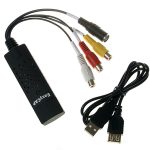


🔹 Key Features & Uses
✔ Inputs:
- Composite (RCA): Yellow (video), Red/White (audio)
- S-Video (on some models)
✔ Output: USB 2.0 (connects to PC for recording/streaming)
✔ Compatibility: Works with Windows (often needs drivers), macOS/Linux (limited support)
✔ Resolution: Typically 480i/576i (standard definition)
✅ Common Uses:
- Digitizing VHS tapes, old home videos
- Capturing gameplay from retro consoles (PS2, Wii, etc.)
- Basic video streaming (e.g., security cameras)
🔹 Setup Guide
- Install Drivers (Windows often needs CD/downloaded drivers).
- Connect RCA/S-Video cables from your source (VCR, camera, etc.).
- Plug into USB and open capture software (e.g., OBS, AMCap).
- Record/Stream via your preferred software.
⚠ Note:
- Cheap EasyCAP clones may have driver issues—look for genuine versions.
- Quality varies: Expect SD resolution with some noise.
🔹 Troubleshooting
❌ No Video?
→ Try different software (e.g., VirtualDub, VLC).
→ Check device manager for driver errors.
❌ Choppy Playback?
→ Lower resolution/frame rate in settings.
→ Use a USB 2.0 port (USB 3.0 can cause issues).
❌ No Sound?
→ Ensure audio RCA cables are connected.
→ Select correct audio input in software.
🔹 Alternatives
| Device | Pros | Cons |
|---|---|---|
| Elgato Video Capture | Better quality, easy setup | Expensive |
| Roxio Easy VHS to DVD | Includes editing software | Pricier |
| Hauppauge USB-Live 2 | HD support, reliable | Costlier |



Reviews
There are no reviews yet.