

🔹 Key Features & Ports
- Video Output
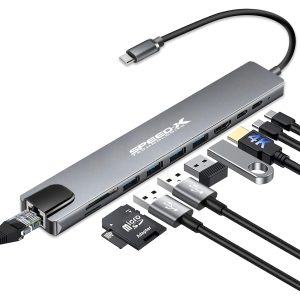
- 4K HDMI (30Hz or 60Hz, depending on model) – Supports Ultra HD displays.
- VGA (optional in some models) – For legacy projectors/monitors.
- Data & Power
- USB 3.0 Ports (5Gbps) – Fast file transfers (typically 2-3 ports).
- USB-C PD (Power Delivery) – Charges your laptop (e.g., up to 60W/100W).
- SD/TF Card Readers – For memory card access.
- Connectivity
- Gigabit Ethernet – Wired internet (useful for stable connections).
- 3.5mm Audio Jack – For headphones/mic.
- Design
- Compact, aluminum/plastic body (varies by model).
- Plug-and-play (no drivers needed for most functions).
🔹 Compatibility
✅ Works With:
- Laptops: MacBook Pro/Air, Dell XPS, HP Spectre, etc.
- Tablets: iPad Pro (USB-C), Samsung Galaxy Tab.
- Phones: Some Android phones (e.g., Samsung DeX mode).
⚠ Note:
- 4K @ 60Hz requires USB-C Alt Mode/Thunderbolt 3.
- Ethernet/HDMI may need drivers on older Windows/macOS.
🔹 Performance
| Port | Speed/Resolution | Real-World Use |
|---|---|---|
| HDMI | 4K @ 30Hz (or 1080p @ 60Hz) | Crisp video, slight lag in gaming |
| USB 3.0 | 5Gbps (~400MB/s) | Fast for external HDDs/flash drives |
| Ethernet | 1Gbps | Stable for streaming/gaming |
| USB-C PD | Up to 100W (varies) | Charges most laptops |
🔹 Setup Guide
- Plug into USB-C port (ensure snug fit).
- Connect peripherals (monitor, mouse, etc.).
- Power Delivery – Use a high-wattage charger for laptop charging.
- Troubleshoot drivers (if Ethernet/HDMI isn’t detected).
🔹 Common Issues & Fixes
❌ HDMI Not Working?
→ Try a different USB-C port (some laptops have limited Alt Mode support).
→ Lower resolution to 1080p if 4K fails.
❌ USB 3.0 Slow?
→ Avoid using all ports simultaneously.
→ Check for USB-C power negotiation issues.
❌ Overheating?
→ Disconnect unused devices.
→ Use hubs with aluminum heat dissipation.



Reviews
There are no reviews yet.