
🔹 Key Features
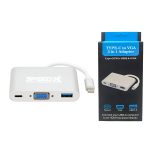
- VGA Output (Analog Video)
- Converts USB-C digital video to VGA (supports up to 1080p@60Hz).
- Lets you connect to older monitors, projectors, or displays with VGA input.
- USB 3.0 Port (5Gbps Data Transfer)
- Connect peripherals like flash drives, external HDDs, keyboards, or mice.
- Backward compatible with USB 2.0 devices.
- USB-C OTG (On-The-Go) Support
- Allows host mode for smartphones/tablets (e.g., connect USB drives to Android phones).
- Some models support USB-C passthrough charging (check specs).
- USB 3.1 Gen 1 (5Gbps) Type-C Input
- Ensures fast data transfer and stable power delivery.
🔹 Compatibility
✔ Works With:
- Laptops: MacBook Pro/Air, Dell XPS, HP Spectre, Lenovo Yoga, etc.
- Phones/Tablets: Samsung Galaxy (DeX mode), Huawei, iPad Pro (USB-C models).
- OS Support: Windows, macOS, Chrome OS, Android (OTG-enabled devices).
❌ Limitations:
- No 4K support (VGA maxes out at 1080p).
- No HDMI/Digital Video (only VGA analog output).
- Check power delivery (some adapters don’t support charging).
🔹 Common Use Cases
- Office/Home: Connect a VGA projector or monitor while using a USB mouse/keyboard.
- Mobile Productivity: Use USB OTG to access files on a flash drive from a phone/tablet.
- Legacy Device Support: Interface with older peripherals that lack USB-C.
🔹 Setup Guide
- Plug the USB-C connector into your laptop/phone.
- Connect VGA to an external monitor/projector.
- Attach USB devices (flash drives, peripherals) to the USB 3.0 port.
- For OTG on Android: Enable “OTG mode” in settings (varies by device).


Reviews
There are no reviews yet.