
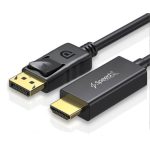
🔹 What is a DP to HDMI Cable?
A 1.8-meter (6-foot) integrated cable that connects a DisplayPort source (PC/laptop) directly to an HDMI display (monitor/TV) without a separate adapter.
Transmits both video + audio (unlike VGA).
Unidirectional: Only works DP → HDMI (not reversible).
🔹 Key Features
Plug-and-Play
No external power/drivers needed (works with Windows/macOS/Linux).
Resolution Support
Up to 4K@30Hz (or 1080p@60Hz)** (depends on DP version).
Audio Support
HDMI carries embedded audio (set HDMI as default output in OS settings).
Durable Design
Braided/nylon coating for tangle-free use (varies by brand).
🔹 Compatibility
✔ Works With:
Laptops/Desktops: DP 1.2+ ports (e.g., gaming PCs, MacBook Pro with DP, Dell XPS).
Displays: HDMI 1.4+ monitors, TVs, projectors.
OS: Windows 10/11, macOS, Linux, Chrome OS.
❌ Won’t Work With:
USB-C/Thunderbolt ports (needs USB-C to HDMI cable).
HDMI to DP (this cable is one-directional).
HDCP 2.2 issues: Some 4K streaming apps (Netflix) may block content.
🔹 Setup Guide
Plug the DisplayPort end into your PC/laptop.
Connect the HDMI end to your display.
Select the correct HDMI input on your monitor/TV.
Adjust resolution if needed:
Windows: Right-click desktop → Display Settings → *1920×1080* or *3840×2160*.
macOS: System Preferences → Displays → Scaled.



Reviews
There are no reviews yet.